

The Seven OSI Layers Explained
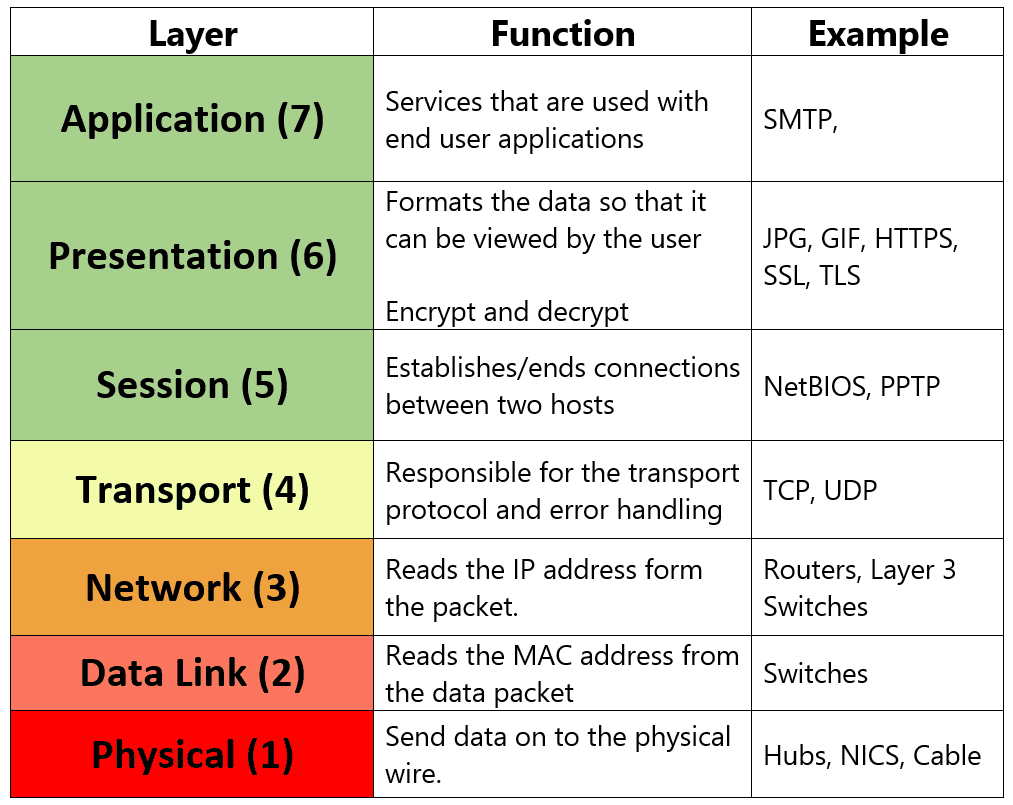
From the top, or the layer closest to the user, down, these layers are:
- Layer 1 – Physical: The Physical layer’s name says it all. This layer defines the electrical and physical specifications for the networking media that carry the data bits across a network.
- Layer 2 – Data Link: As its name suggests, this layer is concerned with the linkages and mechanisms used to move data about the network, including the topology, such as Ethernet or Token Ring, and deals with the ways in which data is reliably transmitted.
- Layer 3 – Network: This is the layer on which routing takes place, and, as a result, is perhaps the most important OSI layer. The Network layer defines the processes used to route data across the network and the structure and use of logical addressing.
- Layer 4 – Transport: The functions defined in this layer provide for the reliable transmission of data segments, as well as the dis-assembly and assembly of the data before and after transmission. This is where my UDP fragmentation issue occurred – understanding VPN protocols and their transport mechanisms is crucial for network troubleshooting.
- Layer 5 – Session: The Session layer establishes, maintains, and manages the communication session between computers.
- Layer 6 – Presentation: This layer is concerned with data representation and code formatting.
- Layer 7 – Application: The Application layer provides services to the software through which the user requests network services. Your computer application software is not on the Application layer. This layer isn’t about applications and doesn’t contain any applications. In other words, programs such as Microsoft Word or Corel are not at this layer, but browsers, FTP clients, and mail clients are.
PDU Names on the Layers of the OSI Model
Each layer of the OSI model formats the data it receives to suit the functions to be performed on that layer. In general, the package of data that moves through the layers is called a Protocol Data Unit (PDU). However, as the data is reformatted and repackaged, it takes on unique names on certain layers. Table 1 lists the name each layer uses to refer to a message.
Absolutely memorize the information in Table 1 to the point that you can recite the data unit name associated with each of the OSI model’s layers. Understanding these PDU names is essential for network troubleshooting – particularly when dealing with issues like the UDP fragmentation I mentioned earlier. When working with networking protocols in enterprise environments, knowing exactly which layer is causing problems saves valuable time.
| OSI Layer | PDU Name |
| Application | Data |
| Presentation | Data |
| Session | Data |
| Transport | Segment |
| Network | Packet |
| Data Link | Frame |
| Physical | Bits |
Practical Application of OSI Layers
The OSI layers model isn’t just theoretical – it’s incredibly practical for network troubleshooting. In my recent case with UDP fragmentation, understanding that UDP operates at Layer 4 (Transport) helped me quickly identify where the problem originated. The packet fragmentation was occurring because the UDP segments exceeded the maximum transmission unit (MTU), causing splits at the network layer.
When dealing with VPN configurations or complex networking setups, the OSI layers provide a systematic approach to isolating issues. Start from Layer 1 (Physical) and work your way up, or identify symptoms that point to specific layers.
For anyone working in network security or system administration, the OSI layers serve as a universal language for discussing network problems and solutions. Whether you’re configuring firewalls, optimising network performance, or troubleshooting connectivity issues, this model provides the framework for systematic problem-solving.
Conclusion
The OSI layers model remains one of the most important concepts in networking, even decades after its introduction. From troubleshooting UDP fragmentation issues to understanding how VPN protocols operate across different layers, this model provides the foundation for effective network management.
Remember the mnemonic “Please Do Not Tell Secret Passwords Anytime” and you’ll always be able to recall all seven OSI layers in order. More importantly, understanding how data flows through these layers – from application data down to physical bits and back up again – will make you a more effective network professional.
4 comments
This was a must have for CCNA, but only had a focus on upper layers. I really want to learn more about the actual packet process and development.
Nice Acronym
Hello,
Awesome post!
Hope it’ll bring great value for IT managers to using OSI layers in his projects. It’s really awesome to learn more about OSI model.
The OSI model breaks the network communications process into seven separate layers.
nice content. thanks